
Release 3.17
Note: Feature availability varies by retailer program, channel, and advertiser access. See each section below for details, or contact your account manager for more information.
-
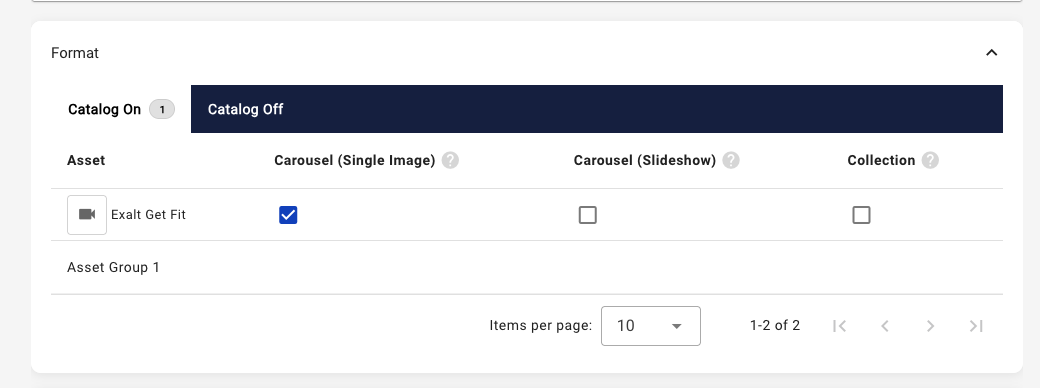
Meta Combined Catalog On and Off Campaigns: Catalog control has shifted in the Meta campaign workflow to allow for more flexibility in mixing catalog on and catalog off ads within the same ad group. For Traffic and Sales objective campaigns, the ad format selection includes a two-tab design to designate these different ad format types. The available ad formats will continue to depend on the types of assets selected in the Asset tab of the campaign workflow.
Note: There are no changes to Awareness objective campaigns. To view both catalog on and off ad formats on Sales objective campaigns, the advertiser must have access to the Sales catalog control.
-
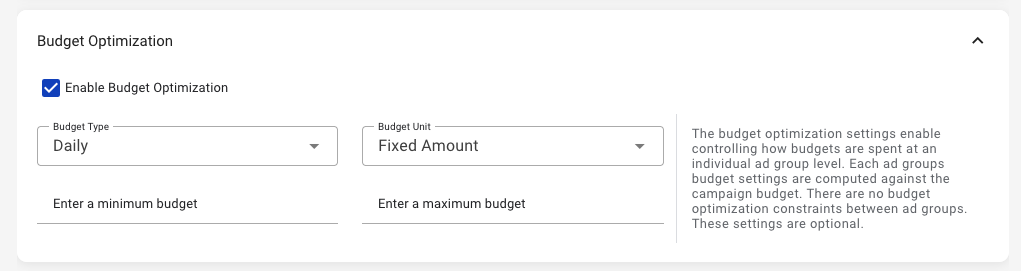
Meta Ad Group Budget Optimization: There is now the ability to set ad group specific budget minimum and maximums for each ad group within a Meta campaign. The ad group budget optimization type will be the same as the campaign’s budget type. The minimum can be set based on a percentage of total campaign budget or a defined amount. This is optional and can be enabled for specific ad groups within the same campaign.
Note: The ad group budget maximum must fall within the campaign budget amount.
-
Meta Additional Targeting Settings: The Threads placement is now available within the Meta placement targeting setup. Additionally, it’s now possible to add user language as an optional audience targeting parameter. Both settings are now visible in the Meta ad group setup within the campaign workflow.
-
Note: A Threads profile is required on the retailer’s Instagram account in order to utilize the Threads placement.
-
-
Pinterest Reach Estimator: The Pinterest campaign workflow now includes an audience estimated size indicator to understand potential audience sizes based on targeting settings.
-
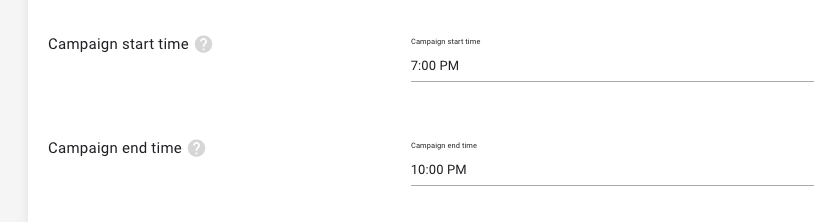
[RETAILER] Custom Campaign Start and End Hour of Day: A new retailer setting is available to define the hour of day to start and end campaigns for the first and last day of campaign flights. When customized, the start and end hour will be used in all campaigns for supported channels. To view the setting as a retailer, see the Account Settings page. To request updates, please contact your account manager.
Note: The time of day is reflective of the retailer’s timezone. This does not impact the start time and end time for each day within the campaign flight. This setting is not visible to advertisers.
-
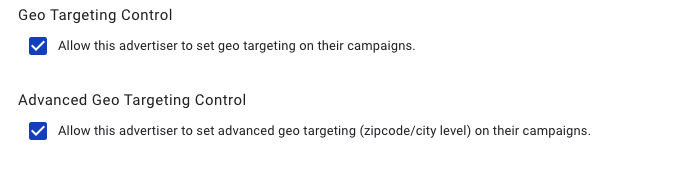
Advertiser Campaign Control - Advanced Geo Targeting: An advanced campaign control is now available within advertiser setup to allow access to zip and city geo targeting in supported channels. Advertisers with access to geo targeting are eligible for this advanced setting.
-
Miscellaneous improvements and bug fixes, including but not exclusive of the following:
-
We’ve expanded the option to add more than one static carousel (non-catalog) per ad group in the Meta campaign workflow.
-
Updates to the The Trade Desk campaign workflow to support optional custom CPM targets.
-
Ad layout previews within the asset creation workflow now include Pinterest and SnapChat.
-
The Google campaign workflow will hide the Assets tab if not applicable for the selected campaign type.
-