
Release 4.6
Note: Feature availability varies by retailer program, channel, and advertiser access. See each section below for details, or contact your account manager for more information.
What’s New
-
Launch multi-channel Sponsored Products campaigns across Google Shopping and DoorDash Ads.
-
Optimize delivery with multiple ad group support, ad-group product set targeting, scheduling, budget controls, and optional YouTube Target CPA.
-
Improve campaign measurement with custom URL parameters, dynamic macros, and destination-URL previews.
1. Channel Expansion: Multi-Channel Campaigns combining Google Shopping and DoorDash Ads
Run catalog-based Sponsored Products across Google Shopping and DoorDash Ads from a single multi-channel campaign. Maintain channel-specific budget allocation, bidding, and targeting strategies while managing one campaign.

Availability: Available to select retailers and advertisers enabled for multi-channel campaigns with Google Shopping and DoorDash Ads access
2. Campaign Optimization: Ad Group and Product Controls
Refine campaign delivery and audience targeting with enhanced ad group controls and flexible product-set targeting for catalog-enabled ads.
Google Multiple Ad Groups
Create multiple ad groups within eligible Google campaigns to reach distinct audiences with tailored targeting strategies.
-
Supported on Google Shopping, Performance Max, and Search campaign types.
YouTube CPA Target
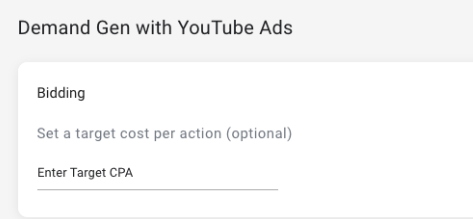
Set an optional Target CPA for eligible YouTube sales campaigns to guide bidding toward your desired acquisition cost.
Meta and Google Ad Group Product Set Customization
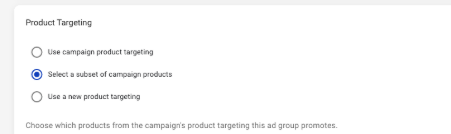
Match each ad group’s products to its dedicated audience targeting while maintaining one campaign-level product set. Choose the campaign product set, a subset of campaign products, or a unique product set for each ad group.
Options include:
-
The same product set defined at the campaign level
-
A subset of products from the campaign’s product set
-
A unique product set
DoorDash Ads Ad Group Schedule Overrides
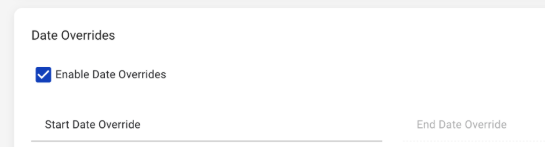
Set ad group start and end dates for DoorDash Ads campaigns to align delivery with specific campaign timing strategies.
The Trade Desk Ad Group Budget Overrides
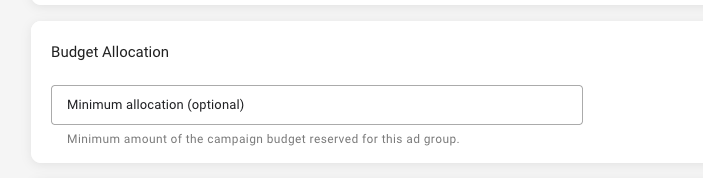
Reserve a minimum budget for specific ad groups in The Trade Desk campaigns, helping align spend with individual targeting strategies. When no minimum is set, the campaign budget continues to distribute dynamically across ad groups.
Availability: Available to retailers and advertisers with eligible Google, YouTube, Meta, DoorDash Ads, or The Trade Desk access, depending on the capability
3. Measurement & Reporting: Custom URL Parameter Support
Append custom query parameters to an asset’s destination URL in a streamlined workflow.
Custom URL Query Parameters
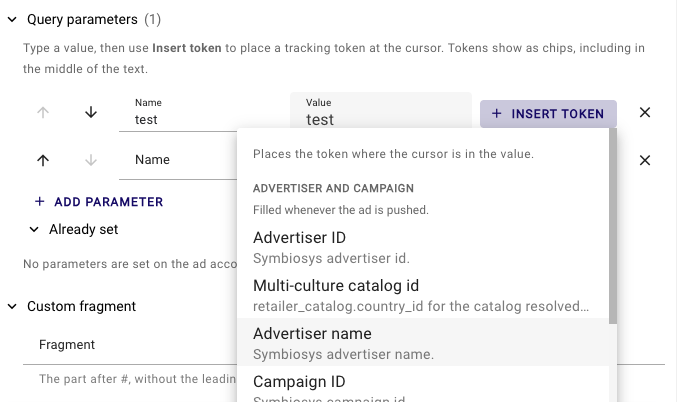
Add static query parameters, dynamic macros, and custom fragments to asset destination URLs to support consistent measurement. You can also apply parameters at the ad level and preview the final URL before publishing.
-
Define parameters: Enter a parameter name and assign a static value, dynamic value, or both.
-
Use dynamic tokens: Pass programmatic attributes into destination URLs.
-
Append custom fragments: Add fragments when needed.
-
Apply parameters at the ad level: Add URL parameters to individual ads.
-
Preview the final URL: Review the updated destination URL before publishing.
Availability: All retailers and advertisers with parameter access enabled
Additional Improvements
-
Channel Specific Minimum Budgets: Set a minimum budget per channel to help maintain planned investment across multi-channel campaigns.
-
Advertiser Controls - Multi-Channel Budget Allocation Defaults: Set budget allocation percentage defaults for advertisers with access to multi-channel campaigns.
-
Advertiser Controls - Multi-Channel Budget Allocation Permission: Limit advertiser access to campaign budget allocation for multi-channel campaigns. Set advertiser budget allocation defaults or retailer program-wide budget allocation defaults.
-
Advertiser controls - Channel Reporting Permission: Limit advertiser access to channel-level reporting including channel segmentation and Ads reporting.
-
Expanded Child Product Visibility in Product Targeting: View child product counts and expand parent products to review their associated child products during product targeting.
-
Advertiser Controls - Asset Domain Overrides: Allow advertisers to use a specific domain in the asset’s URL for custom landing page optimization. Options include using the retailer’s program-wide default, an advertiser-specific domain, or any domain.
-
Advertiser Controls - Kevel-Powered Onsite Incrementality Target: Allow advertisers to define campaign-specific incrementality targets for eligible Kevel on-site campaigns.
-
Advertiser Controls - The Trade Desk Custom Measurement and Audience Seed Definition: Assign specific pixels at the advertiser or brand-level for campaign optimization and create audience seeds using corresponding data.
-
We are continually deploying improvements between major releases.