
Release 4.5
Note: Feature availability varies by retailer program, channel, and advertiser access. See each section below for details, or contact your account manager for more information.
What’s New
-
Expand on-site campaign capabilities with Kevel-powered Sponsored Products, Commerce Display, and enhanced On-site Display controls.
-
Optimize campaigns with new targeting, product-set, and KPI controls across The Trade Desk, Google, and DoorDash Ads.
-
Streamline audience management through use of new tools and advertiser-friendly audience views.
-
Create and manage more ad formats across YouTube and Meta.
1. Channel Expansion: Kevel-Powered Catalog-Enabled On-site Campaigns
Expand your on-site advertising program with new Kevel-powered Sponsored Products and Commerce Display ad formats. and more control over how Display campaigns target, bid, and use creative assets.
Kevel Catalog Enabled Ads
-
Launch catalog-only Sponsored Products ad groups within a catalog-enabled campaign.
-
Create Commerce Display campaigns that pair catalog products with custom creative assets.
-
Additionally, product-level bid overrides have been added to support catalog-enabled campaigns. Use product-level bid overrides to prioritize the products that matter most in catalog-enabled campaigns.
Kevel Enhanced On-site Display Features
-
Targeting and Bidding Controls: Use new targeting levers for search terms and apply bid modifiers by keyword, search term, segment, site, or zone.
-
Hosted Video Ads: Add hosted video URLs directly to On-site Display campaigns.
-
Ad-level Overrides: Apply flexible ad-level overrides and make updates in bulk to manage ads more efficiently.
Availability: Available to retailers and advertisers with Kevel channel access enabled
2. Reporting & Insights: Enhanced Reporting Experience for Advertisers Report
The reporting table and data visualization have been upgraded to improve report load times, streamline KPI tracking, and simplify table navigation.
Focus on the KPIs that matter: select up to four scorecard metrics and collapse visualization areas when you need more table workspace.
Navigate large reports more easily: persistent headers/footers and clearer column descriptions make detailed reporting easier to explore.
Export cleaner, more useful reports: exports now include filtered totals, cleaner formatting, and no unnecessary row-index column.
Availability: All retailers
3. Campaign Optimization: Targeting and Product Controls
Optimize campaign delivery with new controls for audiences, budgets, performance goals, and product selection across supported channels.
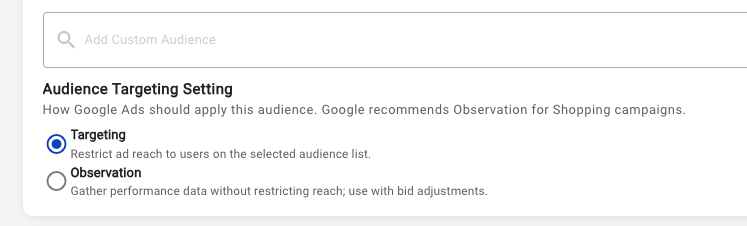
Google Shopping Audience Targeting
Choose how Google Shopping campaigns use selected audiences:
-
Targeting limits delivery to users on the selected audience list.
-
Observation collects audience performance data without limiting campaign reach. Use Observation when you want to understand audience performance while maintaining broad delivery.
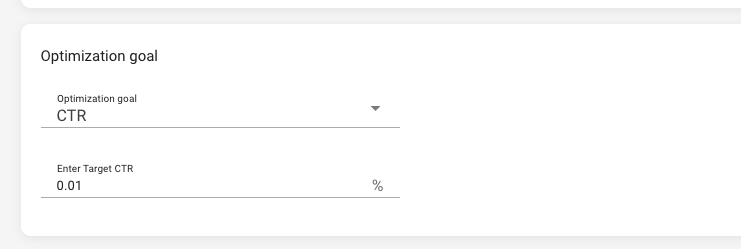
The Trade Desk Traffic Goals
Configure optimization goals that reflect your campaign objectives. Set a custom target CTR or use additional goal types, including CPA, CPC, and viewability.
DoorDash Ads Ad Group Product Set Customization
Match products to each ad group’s dedicated audience targeting, while maintaining one unified product set at the campaign level. Tailor each ad group’s product set to relevant audience targeting.
Availability: Available to retailers and advertisers with specific channel access enabled
4. Audience Management: New Advertiser and Retailer Tools
Manage audiences with clearer visibility into existing mappings and faster tools for applying updates across campaigns.
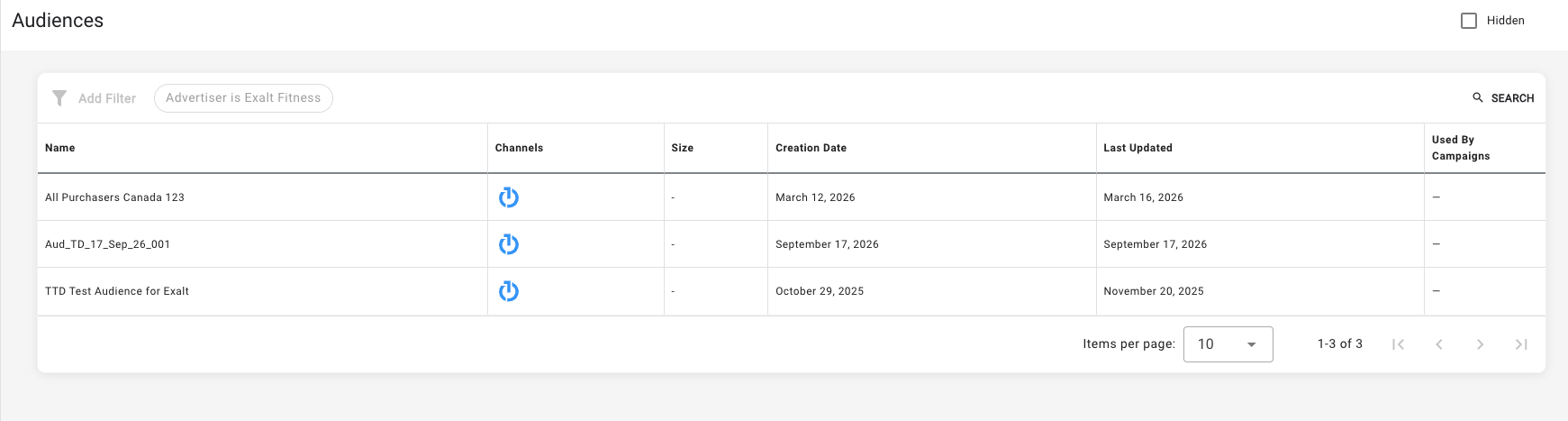
Advertiser Audience Module
A new Audience module is now available by default across advertiser accounts. Use it to view mapped audiences and see the campaigns associated with each audience in one place.
Availability: Available to all advertisers
Retailer Audience Replace Tool
Replace an existing audience with another audience and apply the change in bulk across impacted campaigns.
Availability: Available to all retailers
5. Creative Optimization: New Asset and Ad-Format Capabilities
Demand Gen with YouTube Asset Groups for Multi-Asset Ads
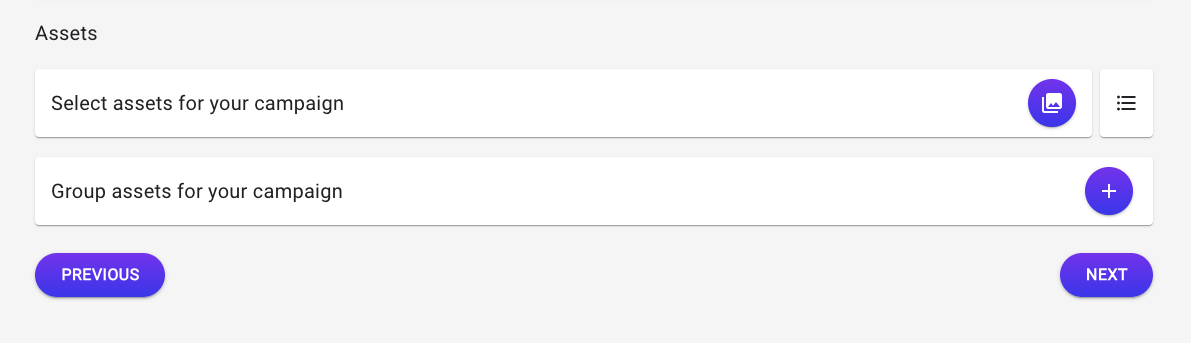
Use optional Asset Groups to create multi-asset ads for Demand Gen with YouTube campaigns. This gives advertisers more format-appropriate creative to use across eligible visual placements. A broader creative mix helps campaigns participate in more eligible inventory, tailor the ad experience to each surface, and test which asset combinations resonate with each audience.
Availability: Available to retailers and advertisers with YouTube channel access enabled.
Meta Single Catalog Ad Format
Enable single-SKU catalog ads through advertiser setup controls. Meta dynamically selects an eligible product from the assigned product set and renders it as a single-card ad.
Meta Partner Post Boosting
Create advertiser campaigns from retailer-approved, partner-owned Meta posts.
Availability: Both Single Catalog and Partner Post Boost are available to all retailers with Meta access and select enabled advertisers.
Additional Improvements
-
Criteo Budget Optimization: Criteo-powered retailer onsite Sponsored Products daily budget recommendations are visible directly in the campaign editing workflow.
-
Demand Gen Deprecation in Google: Demand Gen is no longer supported through the Google channel and has moved to the Demand Gen with YouTube channel.
-
Meta Lead Generation: Optimize eligible Meta Awareness campaigns for website lead submissions using configured pixel and conversion-event tracking. Limited Availability. Please contact your account manager for more details on setup requirements.
-
TikTok Pre-bid IAS configuration: Configure eligible TikTok campaigns to use pre-bid IAS settings. Limited availability. Please contact your account manager for more details on setup requirements.
-
Do Not Bill campaign controls: Apply the Do Not Bill flag to eligible campaigns and review the associated reporting updates.
-
Wallet low-funds notifications: Receive email notifications when Wallet funds run low, helping advertisers add funds before campaign delivery is affected.
-
Meta ad-group limit validation: Meta campaign setup now enforces Meta’s 50-ad limit per ad group. Ads above the limit are automatically paused.
-
Combined time and channel segments: Analyze multi-channel campaign performance with reporting segments that combine time period and channel.
-
Scheduled-report archive status: Track the archive status of scheduled reports more easily.
-
Bulk draft campaign duplication: Duplicate draft campaigns in bulk to speed up campaign setup.
-
Simplified draft campaign creation: Save draft campaigns with fewer required fields, making it easier to begin setup and return later.
-
Streamlined navigation: Retailers can use updated left and top navigation bars for a simpler platform experience.
-
Billing History visibility controls: The Billing History report has been deprecated.
-
Campaign asset search and filtering: Find and select campaign assets more efficiently with new filtering and search capabilities.
-
Enabled ad counts: View the number of enabled ads within an ad group, making it easier to monitor campaign setup
We are continually deploying improvements between major releases.